

Skip to content

Thursday, September 24, 11 a.m.Sphère, what's next: the new features live, with your questions.

Save my seat

Comunik KIT — Phone, chat and video in one place.

Email, calendar, files and notes too, in the browser and on mobile.

Start a trial

Trusted by

  • Tunisair
  • Orange
  • Ford
  • Délice Danone
  • Vistaprint
  • FedEx
  • Peugeot
  • Zara
  • Celio
  • Condor
  • Royal Air Maroc
  • Pathé

The problem

Eight tools. One KIT.

Without Comunik KIT

  • The phone system, messaging, visio and email: as many apps, as many accounts
  • Going from a call to a video meeting means switching apps and retyping the number
  • The call is in one tool, the decision in another
  • Two colleagues answer the same customer, or nobody does

With Comunik KIT

  • Calls, chat, visio, email, calendar, files, notes and broadcast: one app, one account
  • A call becomes a video meeting, a message becomes a task, without changing tools
  • The channel is attached to the case: messages, files and the decision stay with it
  • Every message in the shared mailbox shows who is handling it

At a glance

Bring the team together. Keep control.

Team collaboration

Channels, threads, mentions

RB
Rim Bouazizi09:02
@everyone Astréa's truck leaves at 2 pm. We still need the signed release note for pallet 3.
422 replies · today
SL
Sonia Lahmar09:11
Here is the pallet, photographed at dock 2.
release-note-pallet3.pdf248 KB
RB
Rim Bouazizi09:12
Thanks Sonia. The release note is still missing its signature.

It suggests, you stay in control

Meeting ended · recorded

Sovereignty

Designed, hosted and run by a Tunisian operator since 2006. Your data lives on our cloud, on a dedicated cloud or on your own servers.

Advanced IP telephony

Switchboard, queues, voice server

Suite of applications, one account

VoIP

The company phone, one screen at a time.

The phone system,
set up and read live.

Numbers, queues, call forwarding, extensions: everything is set up in the same console. The live panel then shows calls in progress, the service level and each colleague's status. We write and run the call engine ourselves, in our cloud, at your site or both.

  • SIP trunks
  • Inbound numbers
  • Outbound routes
  • Queues
  • IP phones & provisioning
  • Monitoring & history

Chat

The chat where the working day happens.

A message becomes a ticket, an opportunity or an activity. Share a deal: its card appears in the thread, with its status. Call, video meeting, email, Drive file: everything opens from the channel, without leaving it.

Visio

One meeting, one link. No account to create.

A meeting starts from a channel or sits in the calendar. Your colleagues join through the platform, a client through a link, in their browser. You decide who comes in.

  • External guests: one link, no account or install.
  • Waiting room: you admit each person.
  • Screen sharing, whiteboard, polls.
  • Recording and summary in the meeting record.
  • Live captions and meeting notes.
  • Questions & answers, raised hand, reactions.
See the details

Agenda

A task, a meeting, a reminder.
The same object.

The table, the kanban and the calendar show the same activities: tasks, meetings, calls, video calls, follow-ups. Each has its due date, its priority and its assignees, and links to a contact or an organisation.

  • Table
  • Kanban
  • Week and month
  • Statistics
  • Assignees and roles
  • Linked contacts

Mail

One shared mailbox.
One owner per message.

  • Your current addresses, over IMAP and SMTP.
  • One owner per thread, by hand or by rules.
  • An assigned thread: only its owner replies.
  • Internal comments, hidden from the client.
  • “Seen by”: who is reading the thread right now.
  • A response time tracked for each mailbox.
  • Thread summary and a reply drafted by the AI.
  • Scheduled sending, up to 30 days ahead.
  • Attach a file straight from the Drive.
See the details

Koukou AI

The KIT has its AI. It's called Koukou.

In Chat, Video, Calls and Mail, Koukou summarises and suggests a reply. From any screen, Koukou the assistant does what you ask, with your rights.

  • A room caught up in one sentence
  • A suggested reply, in the tone you pick
  • The meeting minutes in the note
  • The call transcribed, summarised, its sentiment
  • The mail thread summarised, the reply ready
  • The assistant files, creates and searches for you

KIT add-ons

Share, write, broadcast. It's all in KIT Full.

The client's files,
filed with the client.

Documents live in the client's or ticket's folder, with its permissions. Uploading a file again creates a version, an external link always has an end date, and Word, Excel or PowerPoint open in the browser.

  • Viewer or editor
  • Version history
  • Expiring links
  • Password
  • Office in the browser
  • 20-day trash

The Core

Run the whole business from one place.

Dashboard, statistics, automation and settings are the same for KIT, HelpDesk or Finance. Nothing to relearn when you add a product.

Your whole day
on a single dashboard.

Missed calls, mentions, e-mails and upcoming meetings fit on one page. You know where to start, and each block opens its module in one click.

  • Four headline figures
  • Answered and missed
  • Not called back
  • Seven-day curve
  • Conversations by channel
  • Quick actions

Add more products on the same foundation.

HelpDesk, Socials Inbox, Finance and Connect plug into the same Core as the KIT: dashboard, statistics, automation and settings are shared.

HelpDesk

Every request, a ticket you can follow.

Every ticket has a deadline and an assigned agent. The AI copilot suggests the reply, the agent approves it.

Socials Inbox

Every channel, one inbox.

Your team replies without switching apps. A conversation becomes a ticket in one click.

Finance

Deals, quotes, invoices and reminders.

Overdue invoices are chased for you.

Connect

The contact centre, from IVR to supervision.

Every call reaches the right queue and an available agent. You follow it all live.

On mobile

Chat, calls, visio in your pocket.

An app for iPhone and Android, on the same account as the browser. Reply in a channel, take a call or open a file without going back to the office.

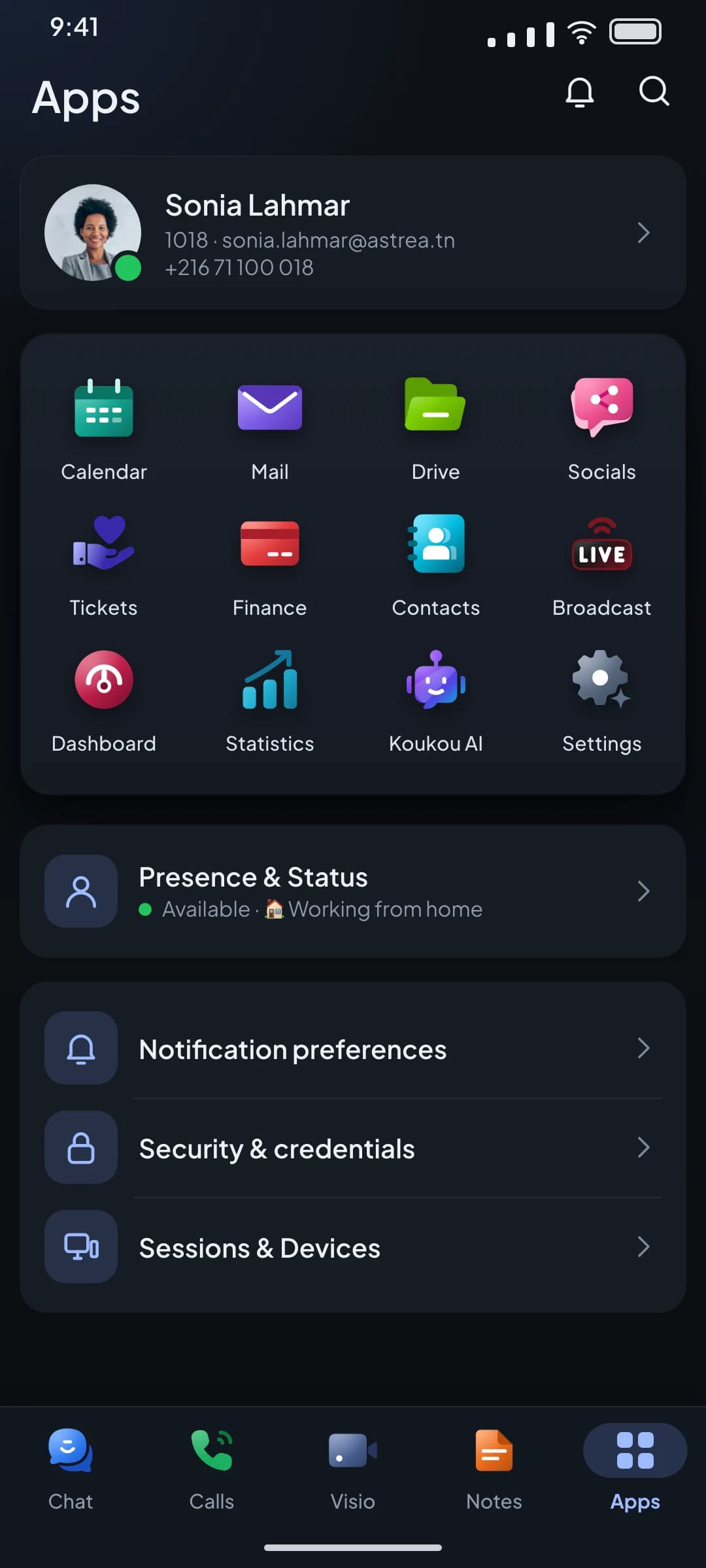
  • Chat, Calls, Visio and Notes in the bottom bar. Calendar, Mail, Drive, Contacts and Broadcast in the app grid.
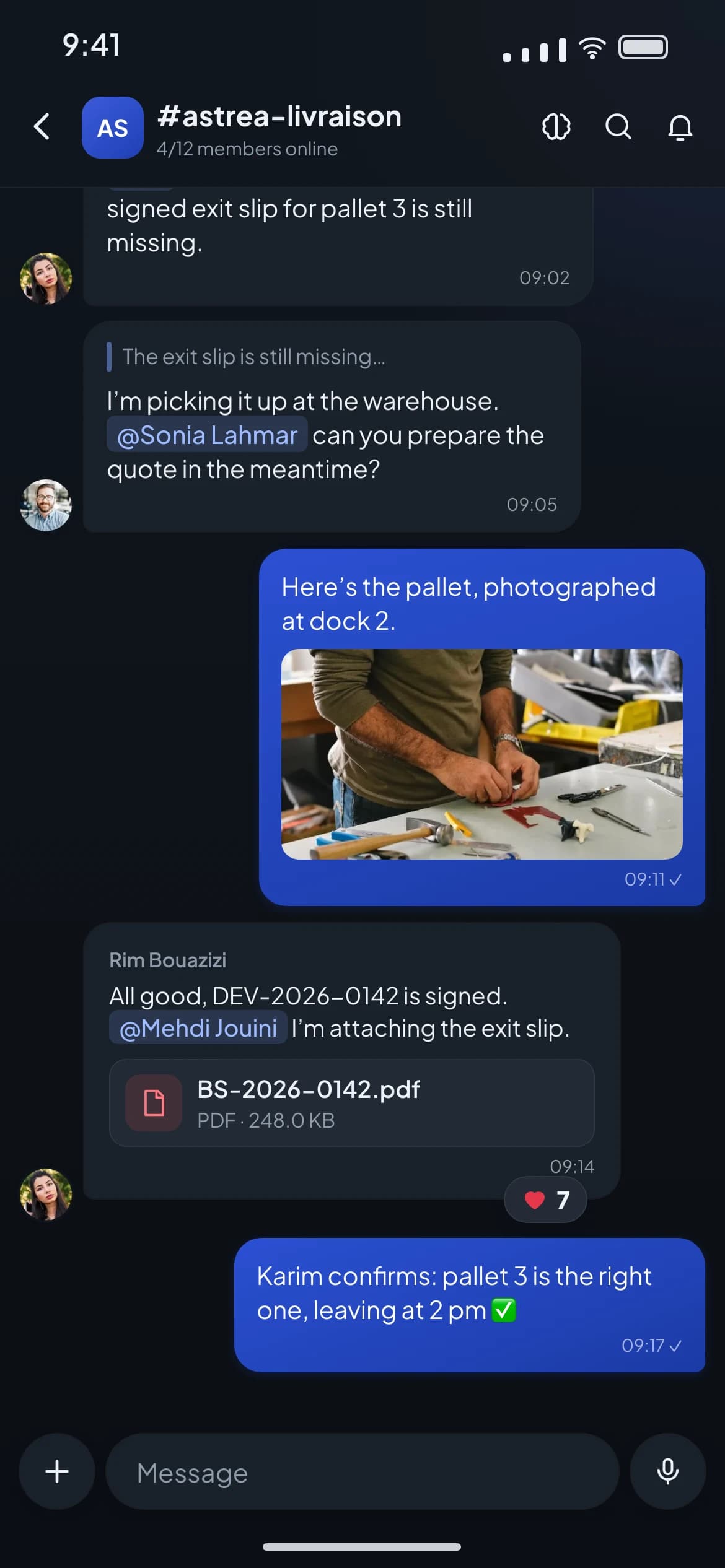
  • Write, mention a colleague, attach a photo, a PDF or a file from Drive.
  • Mute, hold, transfer, conference. A call started on the computer can be picked up on the phone.
The Apps screen of the mobile app: the app grid (Calendar, Mail, Drive, Contacts, Broadcast…) and the bottom bar Chat, Calls, Visio, Notes.
A Chat channel on mobile: a photo of a pallet, an attached PDF, a mention and a reaction on a message.

Security

Who gets in, who sees what, where it sleeps.

What is in place today, without the packaging: where your data sleeps, who can open it, how it travels, and what stays on record after every action.

01 / 06

Your data sleeps where you decided

On the Comunik cloud, in Tunisia. In a dedicated cloud, in the country you name. Or at your place, on your hardware. The interface is the same in all three cases.

02 / 06

Rights are set module by module

Roles and permissions per module, rights per channel in the chat, reader, editor or owner on a Drive folder. A disabled account loses every access at the same instant, telephony included.

03 / 06

Two-factor authentication and sessions

By app, security key or recovery codes. Open sessions are visible and revocable device by device. Sign-in through SSO is possible.

04 / 06

Encrypted in transit

The interface runs on TLS 1.3, call media on SRTP. Audio and video in meetings are encrypted between each participant and the server. In the chat, end-to-end encryption is switched on room by room, with the keys on your devices.

05 / 06

Every uploaded file is scanned

The antivirus checks everything that enters the Drive: a suspect file goes to quarantine. Sharing links expire and can be password-protected.

06 / 06

Every action leaves a trace

Administration actions are written to a log that can be neither edited nor erased, with no screen to read it yet. The Drive keeps the access history of each document.

Certifications

Certified ISO 27001 and ISO 9001. Check it in the register.

Check on Certipedia
  • ISO/IEC 27001:2022

    Information security

    How your data is classified, protected and returned, audited by TÜV Rheinland.

  • ISO 9001:2015

    Quality management

    Written processes, checked and reviewed: what TÜV Rheinland comes to audit.

Pricing

Three plans. Each one includes the one before.

From 25 users, a volume discount applies.

KIT Start

9.9DT excl. tax

per user per month

That is 99 DT excl. tax per month

  • Full VoIP telephony
  • Voice menu and call queues
  • Transfer, parking, conference
  • Statistics and call log
  • 5 GB of storage
Most chosen

KIT Advanced

16.9DT excl. tax

per user per month

That is 169 DT excl. tax per month

  • Everything in KIT Start
  • Team chat
  • Visio meetings
  • Activities
  • Free internal calls
  • 30 GB of storage

KIT Full

26.9DT excl. tax

per user per month

That is 269 DT excl. tax per month

  • Everything in KIT Advanced
  • Business email
  • Shared mailboxes
  • Drive
  • Notes
  • Broadcast
  • 50 GB of storage

Questions

What we are asked before choosing KIT.

Short answers. If yours is not here, we answer yes or no.

Your whole team in one app. Try it with yours.

One account to call, chat, meet and share files, on the computer and on the phone. The mobile app comes with every plan.

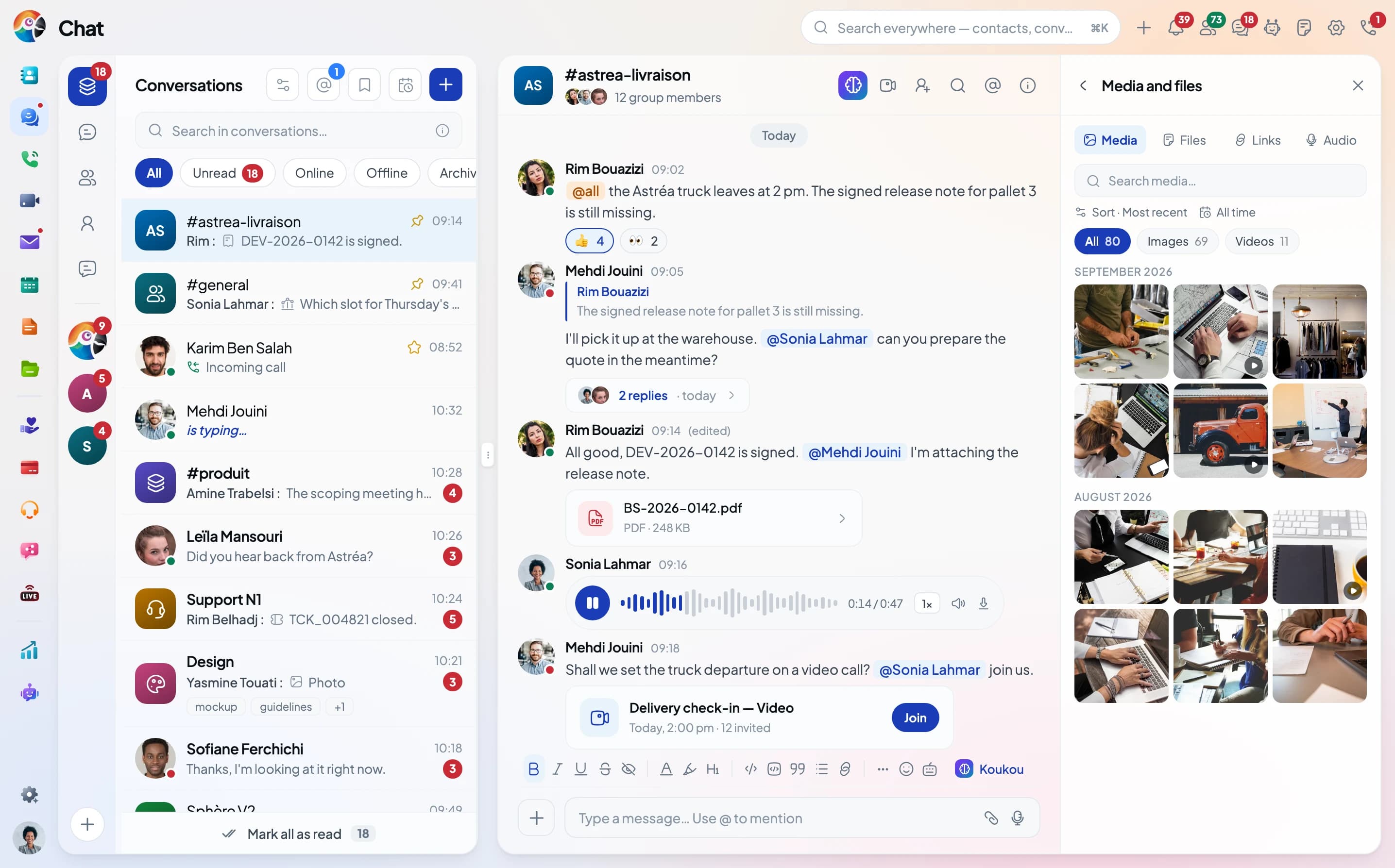
Comunik KIT in the browser: the app bar on the left, the Chat conversation list and the #astrea-livraison channel.